Services variables
Services variables give the possibility to read the status and delivering commands to VNC Server
Protocol Editor Settings
Path: ProjectView> Protocols
- Click + and select System Variables: the System Variables dialog is displayed.
- Select Services from the PLCModels list.
Tag Editor Settings
Path: ProjectView> Config > double-click Tags
- To add a tag, click +: a new line is added.
- Select System Variables from the Driver list: tag definition dialog is displayed.
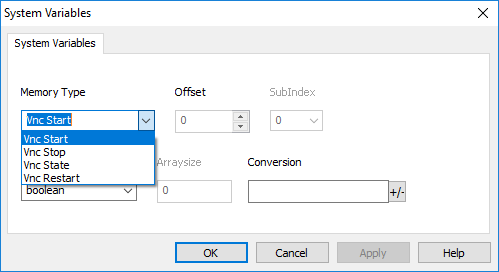
VNC status variables are supported only on Linux devices (See "HMI devices capabilities")
| Element | Description | Data type | ||||||
|---|---|---|---|---|---|---|---|---|
| VNC Start |
Write 1 inside this tag to force the VNC server to start. This is a write only variable, command will executed any time you rewrite it. |
boolean Write Only |
||||||
| VNC Stop |
Write 1 inside this tag to force the VNC server to stop. This is a write only variable, command will executed any time you rewrite it. |
boolean Write Only |
||||||
| VNC Restart |
Write 1 inside this tag to force the VNC server to restart. This is a write only variable, command will executed any time you rewrite it. |
boolean Write Only |
||||||
| VNC State |
VNC server state
|
int Read Only |
Cloud status variables are supported only from Linux devices with BSP version 1.0.298 or greater. (See "HMI devices capabilities")
| Element | Description | Data type | ||||||||||||
|---|---|---|---|---|---|---|---|---|---|---|---|---|---|---|
| Cloud Start |
Write 1 inside this tag to force the cloud connection to start. This is a write only variable, command will executed any time you rewrite it. |
boolean Write Only |
||||||||||||
| Cloud Stop |
Write 1 inside this tag to force the cloud connection to stop. This is a write only variable, command will executed any time you rewrite it. |
boolean Write Only |
||||||||||||
| Cloud Restart |
Write 1 inside this tag to force the cloud connection to restart. This is a write only variable, command will executed any time you rewrite it. |
boolean Write Only |
||||||||||||
| Cloud State |
Cloud connection state
|
int Read Only |
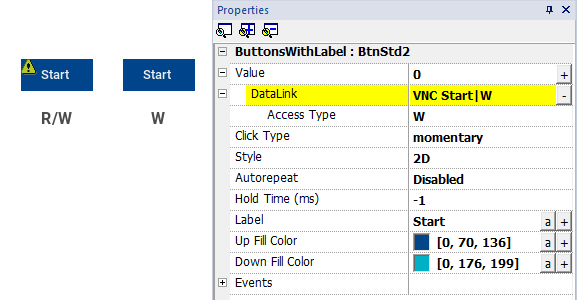
Write Only Variables cannot be read. Be sure to not use the R/W access mode to avoid the read error icon.